 mira
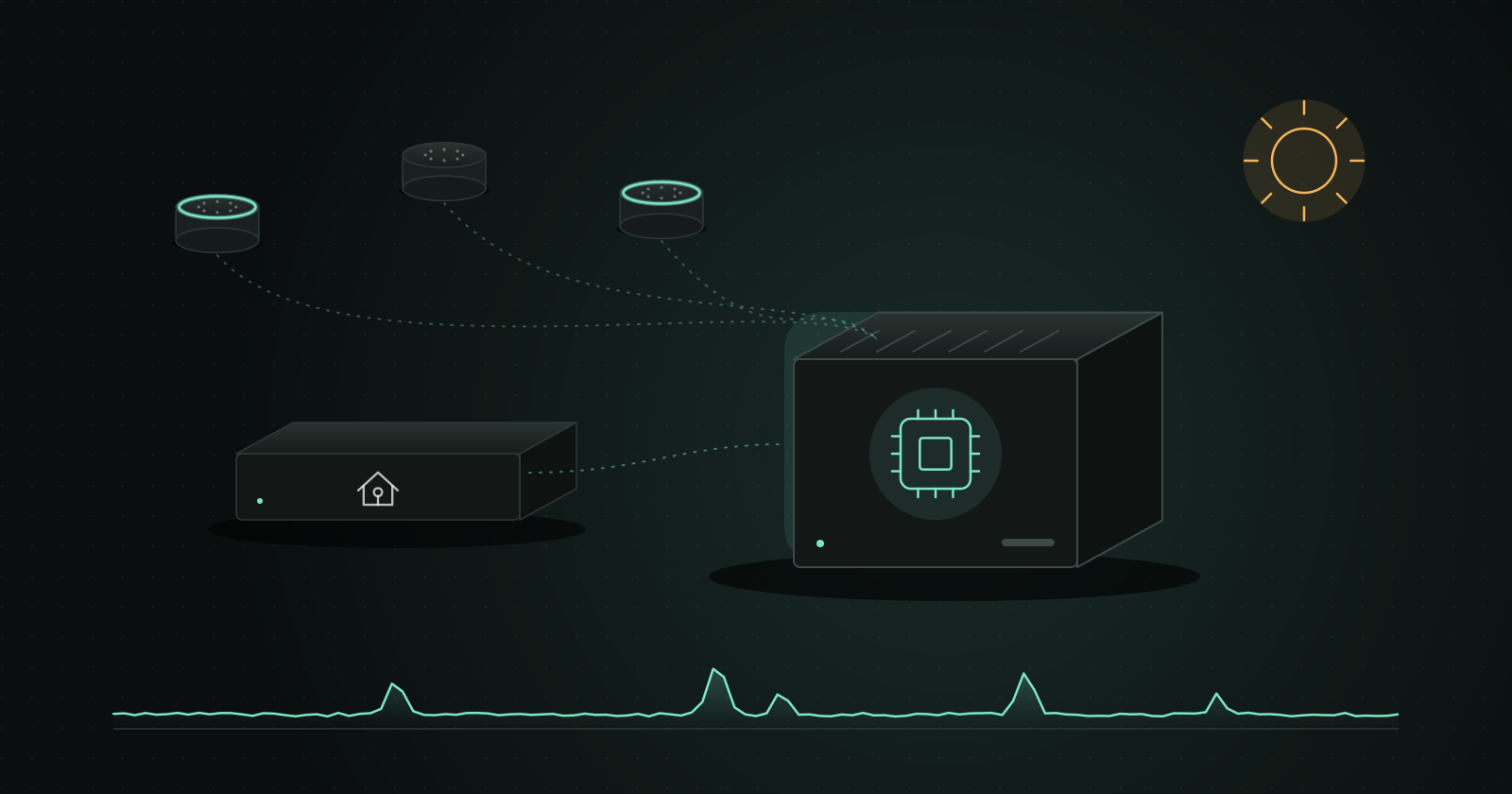
Two boxes, two jobs
When I tell people that Mira runs locally at my place, I almost always get the same question: “So what graphics card have you got in there?” The answer: none. At least not a separate one.
The setup is split across two devices. Home Assistant and the other smart home services run on a frugal NUC that has been quietly doing its job for years. The AI lives separately on a Minisforum AI X1 Pro: Ryzen AI 9 HX 370, built-in Radeon 890M. It came with 32 GB; I upgraded it to 64 GB of RAM. The very machine I’m writing this article on.
The split has a very practical reason: the lights must always work. When I try out a new model on the AI machine, install an update or restart it, Home Assistant doesn’t notice. Switches, automations and motion sensors simply keep going.
- 01EchoThe Echo hears “Mira” and sends what I say to Home Assistant.
- 02WhisperHome Assistant passes the recording to Wyoming Whisper on the Minisforum. About a second later it is text.
- 03Mira + llama.cppMira understands the request, switches things through Home Assistant and answers – spoken by the Echo I asked.
My satellites are Echo devices running TECHO5 – how that works is in the article about the jailbreak. Speech recognition is Whisper (large-v3-turbo) over Wyoming; Mira herself uses a language model in llama.cpp.
How fast is it?
For a voice assistant one thing matters above all: how long it stays quiet after your last word. I measured it.
Speech recognition is pleasantly unspectacular. Whisper runs on the built-in graphics and delivers the text about a second after I stop talking – whether it’s “turn off the living room light” or a five-second sentence.
For the language model two numbers count: how fast it reads the prompt and how fast it writes the answer. My everyday model is Qwen3-30B-A3B, a so-called mixture-of-experts model. It has 30 billion parameters but only uses about three billion of them for each word. On the Minisforum it reads 400 to 650 tokens per second and writes 20 to 30 tokens per second – faster than you can listen.
On top of that there’s a trick that makes a big difference: the front part of Mira’s prompt – personality, tools, notes about the house – is the same for every question. llama.cpp remembers what it has already read. For a new question it only has to process what’s new, often just a few hundred tokens. So a dry “Pitch black.” after “lights off” comes quickly.
- ~1 s
- from my last word to the finished text (Whisper)
- 20–30
- tokens per second written by the everyday model
- 15 W
- drawn by the AI machine when nobody is asking anything
Memory: 64 GB that everyone shares
The real reason this works without a graphics card is memory. The Radeon 890M has none of its own; it shares the main memory. Of the 64 GB the graphics may use up to around 48 GB. The everyday model is an 18.5 GB file; with room for two simultaneous conversations with a long memory, everything together takes about 27 GB on the graphics side, Whisper included.
For comparison: a typical gaming graphics card has 12 or 16 GB. A model this size doesn’t even fit. Here it does – with room to spare.
Power: the real argument
The Minisforum is plugged into a socket with power metering that shows up in Home Assistant as “OfficeKG”. The numbers from the last two weeks are pretty clear: at idle the machine draws 14 to 16 watts. When Mira is thinking, short spikes go up to 65 to 90 watts, and a few seconds later it’s over. Across a day that’s 0.37 to 0.41 kilowatt hours, about 140 a year.
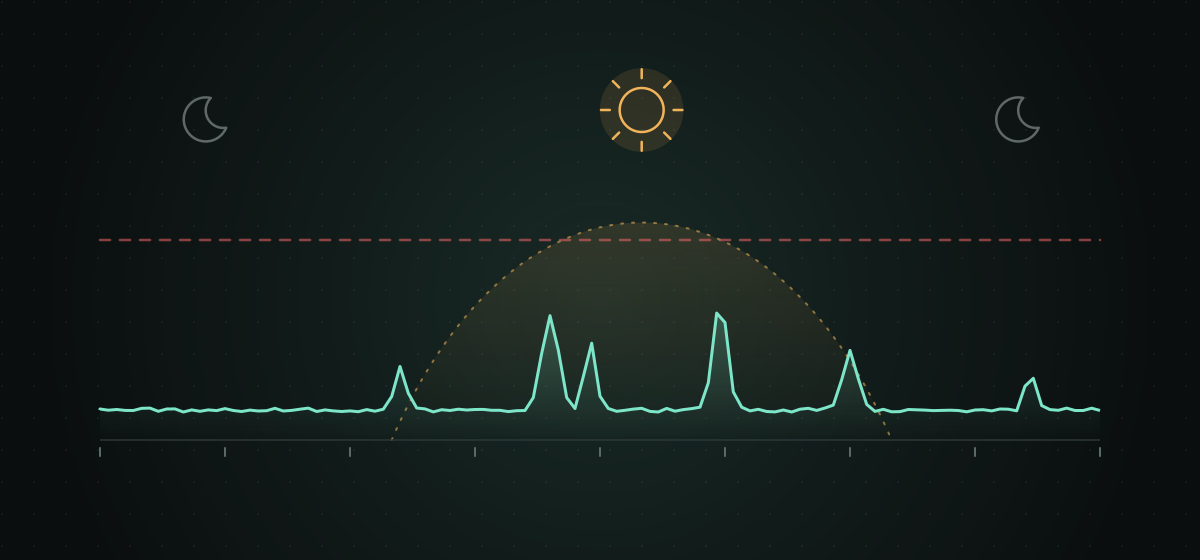
A machine with a big graphics card is faster, of course. But it easily sits at 60 to 100 watts at idle – and a voice assistant is almost always idle. It waits 24 hours a day for someone to say “Mira”. At a constant 80 watts that would be about 700 kilowatt hours a year instead of 140; at a little over 30 cents per kilowatt hour that’s a difference of roughly 170 euros.
With solar panels on the roof the argument gets even stronger. The sun easily covers the short spikes during the day. But the base load runs at night and in December too – exactly when the panels deliver nothing. Every watt the machine doesn’t need at idle counts double.
“A voice assistant is almost always idle. So what matters most is what it draws then.”
The honest limits
Of course all this has its limits, and I don’t want to hide them. Large “dense” models do run on the Minisforum – I tried Qwen 3.8 with 27 billion parameters, for example. The model is clever and the answers are good. But here every word is computed with all 27 billion parameters, and you notice.
- Writing: about 10 tokens per second. For a short answer that’s still fine.
- Reading: about 90 tokens per second – and that’s the real problem. In my logs a 10,000-token prompt took 1 minute and 48 seconds before the first word came.
- For comparison: the everyday model reads the same amount in about 20 seconds – and thanks to the cache it usually only has to read a fraction of it anew.
That makes it pretty clear which model size fits everyday use: a mixture-of-experts model of around 30 billion parameters with only a few of them active. Big enough to understand context and be funny. Fast enough that nobody stands in front of the Echo waiting. The dense heavyweights are for tasks where a minute doesn’t matter.
How Mira deals with it
It gets interesting where the software takes the hardware into account. Mira was built from the start to cope with limited computing power. Two things make the biggest difference.
First: skills are only loaded when they’re needed. Mira comes with around thirty skills, from the bin calendar to the music quiz. All their instructions together would be about 24,000 tokens long. Even the fast model would need almost a minute to read that the first time, the 27B more than four. So the prompt holds just one line per skill, under 2,000 tokens in total. Only when a question needs a skill does Mira open its instructions – and only those.
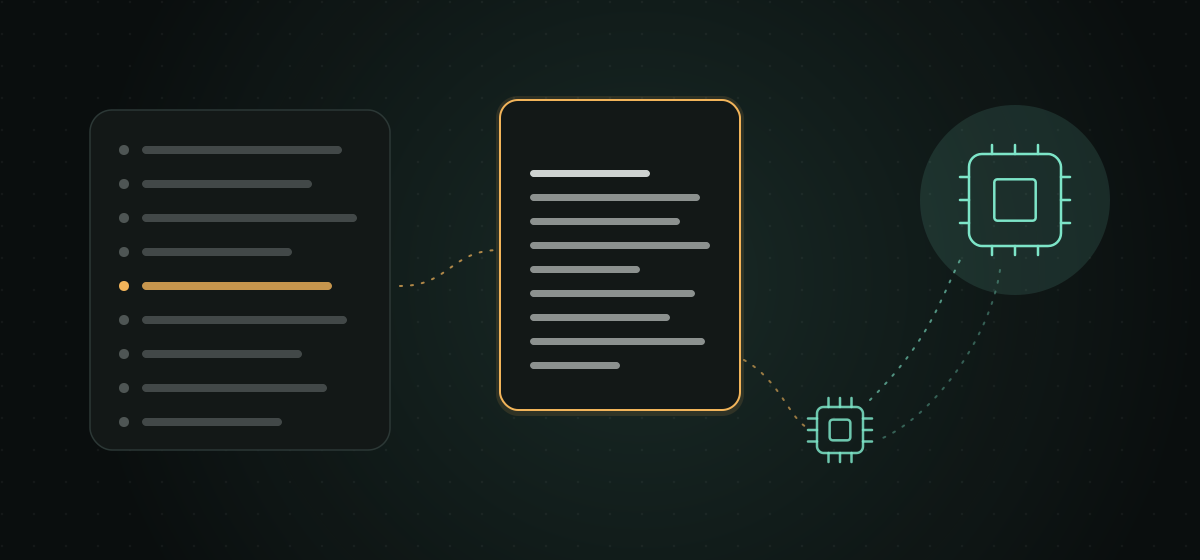
Second: what’s too hard, Mira hands off. The everyday model has a tool called delegate. With it, it passes tasks like planning, detailed explanations or research to a bigger model named in the configuration – local or in the cloud – and reads out its answer. “Lights off” never needs it. A question like this one does:
That keeps everyday use fast, and for the rare hard questions there’s still a clever mind on hand. The small model doesn’t have to be able to do everything. It just has to know when to ask.
How I measured: the latencies come from llama.cpp’s logs and from test sentences I sent to Whisper; the numbers for the 27B from my experiments in October. The power figures come from the Tasmota socket, via Home Assistant’s statistics. Mira itself is open source.
Bottom line: small, frugal, good enough
For a voice assistant in your own home you don’t need a thousand-euro graphics card that heats the basement on the side. A mini PC with plenty of shared memory, a well-chosen model and software that is careful with its resources are entirely enough. Mira answers quickly, knows the house and most of the time draws less power than an old light bulb. That’s exactly how I imagined it.